

Overview
Architecture
Understand how the Autentikar SDK v2 modules work together with your mobile application and the Autentikar API.
Modular design
Autentikar SDK separates orchestration from capture capabilities. Your application always integrates Core and adds only the capture modules required by the registered flow.
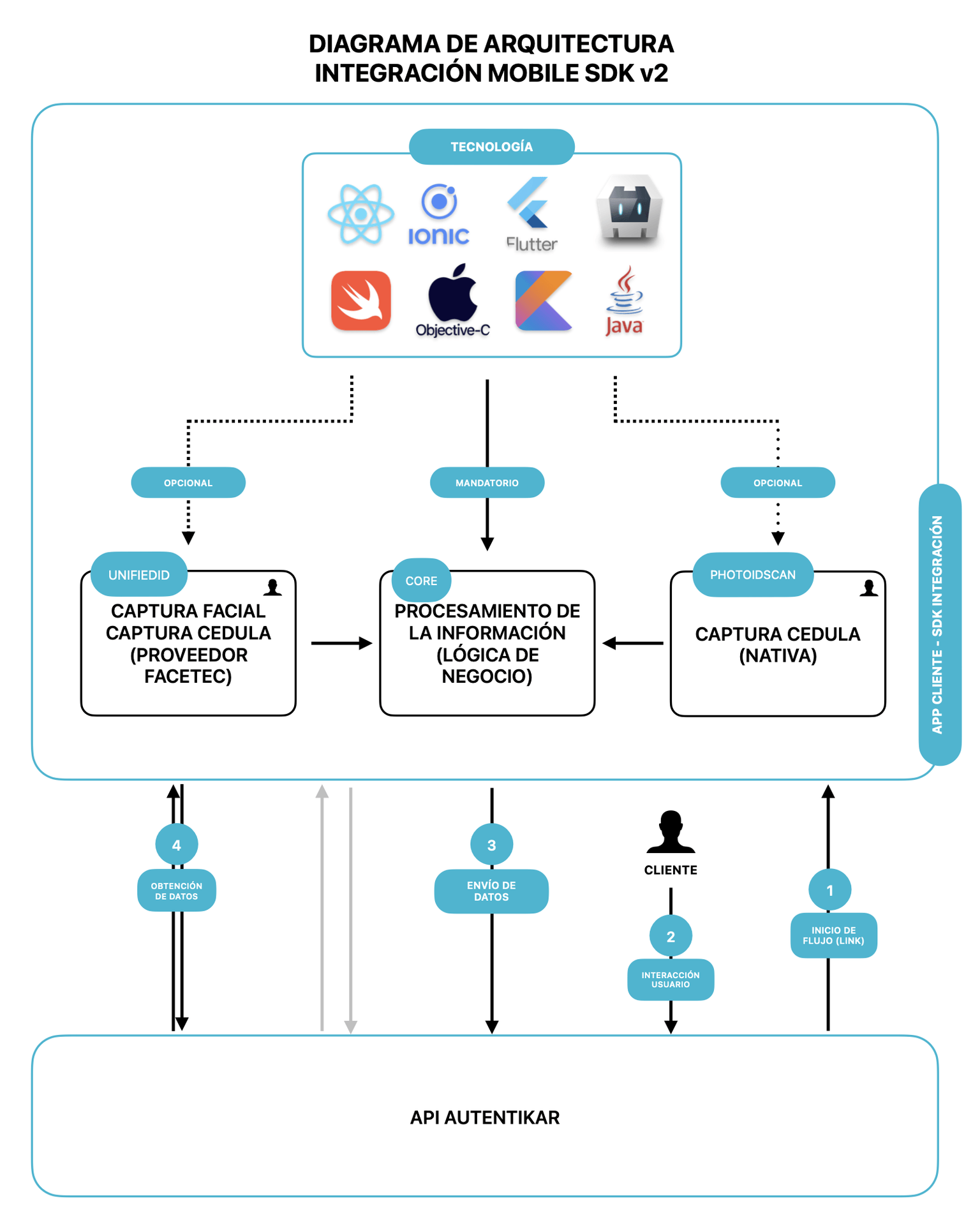
| Module | Required | Responsibility |
|---|---|---|
| Core | Yes | Runs the business logic, communicates with the Autentikar API, and invokes the capture modules registered by the app. |
| UnifiedID | No | Provides facial liveness and ID-card capture through FaceTec. |
| PhotoIDScan | No | Provides native ID-card capture. |
Integration sequence
- The client starts a flow through the Autentikar API and receives the link or code used by the mobile SDK.
- The application starts Core with that value.
- Core obtains the flow steps and delegates each supported capture step to the registered module.
- The capture module returns its result to Core.
- Core sends the captured data to the Autentikar API and continues until the flow succeeds or fails.
Register only the modules and steps used by your flow. This keeps the integration smaller and ensures Core recognizes the expected steps.
Supported application technologies
The native SDKs can be integrated directly into Swift, Objective-C, Kotlin, and Java applications. Hybrid applications can consume them through an appropriate bridge, including Flutter, React Native, Ionic, and Cordova implementations.